In short
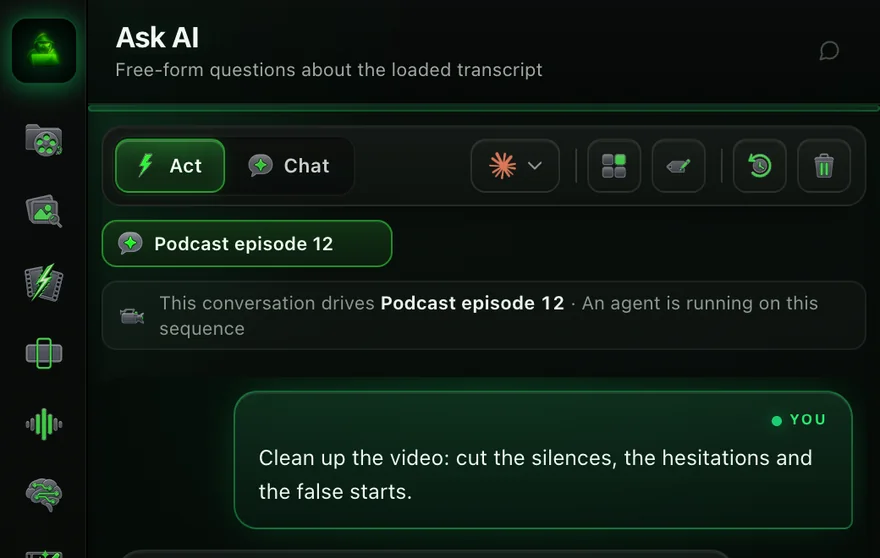
Ask AI is the chat tab of Black Hat Editor Tools, a Premiere Pro panel. You write what you want in plain language; in Act mode, Claude runs the plugin's editing tools on your open sequence: silences, retakes, captions, zooms, B-roll, sound. It runs on your own Claude Pro or Max plan, copies the sequence before cutting, and asks before spending anything.
In this article · 11 sections
- What is Ask AI, exactly?
- What do you need before you start?
- How do you set up Ask AI in Premiere Pro?
- Act or Chat, Plan or Auto: which mode when?
- What can you ask it? Commands to copy, by editing step
- How do you aim it at one passage?
- What stops it from wrecking your edit?
- What does it cost in total?
- Ask AI or another AI agent for Premiere?
- What are its limits?
- The short version
the plugin's own team. Every command was checked on version 1.0.159.
What is Ask AI, exactly?
An agent, not a chatbot: it does the edit instead of describing it. Three differences:
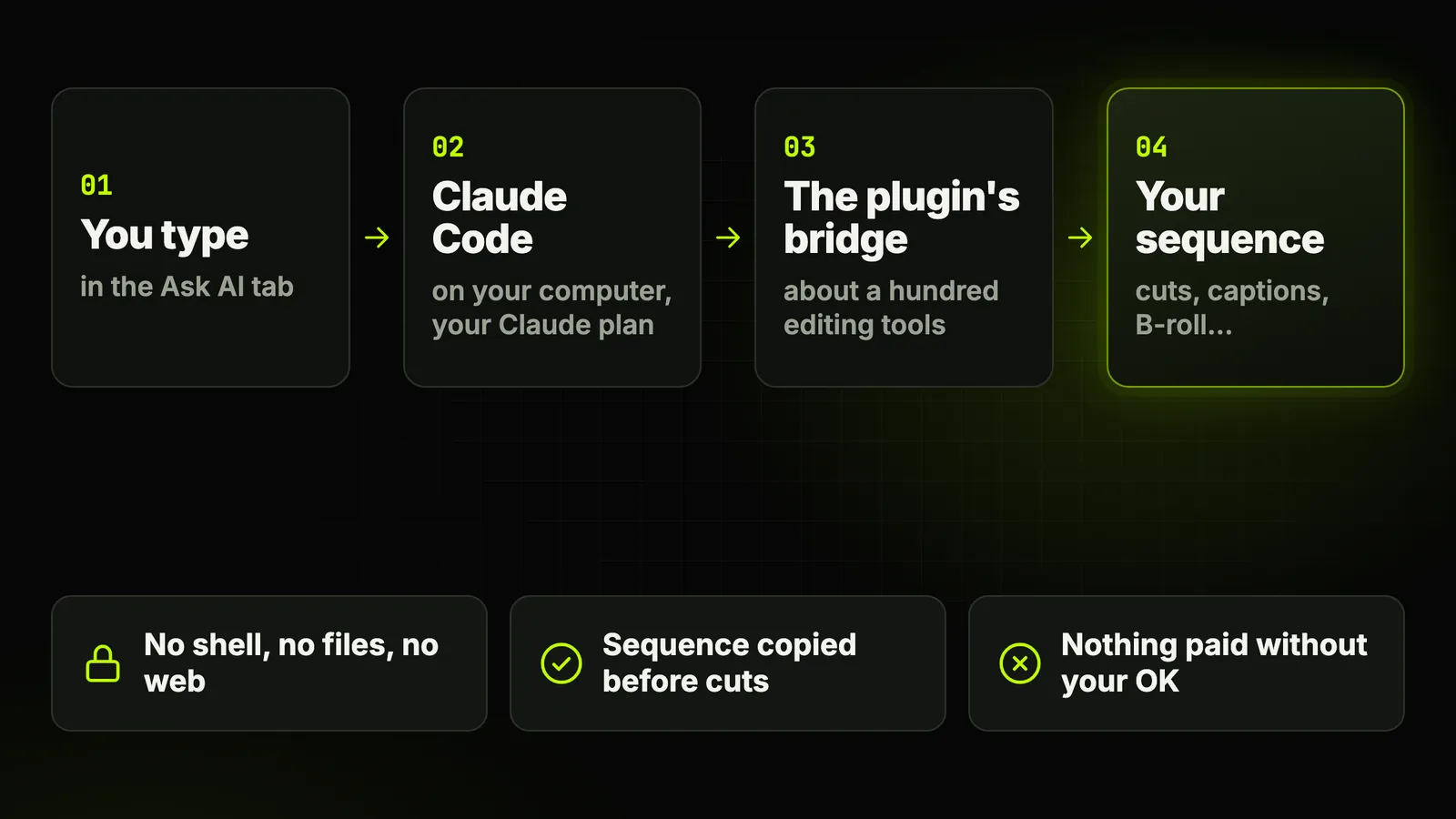
- It works on your timeline. It reads the sequence and its transcript, then calls the plugin's tools, about a hundred of them, through a local bridge.
- It runs on your own Claude. The panel launches Claude Code on your computer with your Claude subscription. No API key ships inside the plugin.
- It stays inside the plugin. It can only act through those tools. Shell, free file writing, web browsing and sub-agents are blocked by name.
The full feature list lives on the Ask AI feature page. This guide is about using it well.
What do you need before you start?
Four things, and one of them is not ours to sell.
- A plan that includes Ask AI. Essentiel at $15 a month or Pro at $40 a month, or the 14-day Pro trial, card required. The free plan doesn't include it (plugin pricing).
- A Claude subscription. Claude Pro or Max, billed by Anthropic, not included in our price.
- macOS and Premiere Pro 2025 or later. Windows is in closed beta.
- A transcript of the sequence. No transcript yet? The chat shows a Transcribe sequence button.
Claude Pro is $20 a month, Claude Code included1.
How do you set up Ask AI in Premiere Pro?
About ten minutes the first time, usually without touching a terminal.
- Install the plugin. Follow the plugin installation guide, then open
Window › Extensions › Black Hat Editor Tools. - Open the Ask AI tab. Open the sequence you want to edit, then switch the chat to Act.
- Install Claude Code. The card Turn on Act mode for your video shows one button: Install Claude (1 click).
- Connect your account. Click Connect my Claude account and sign in to Claude when your browser opens.
- Send a small first request. Start with something you can check in ten seconds:
Cut the silences in the sequence.
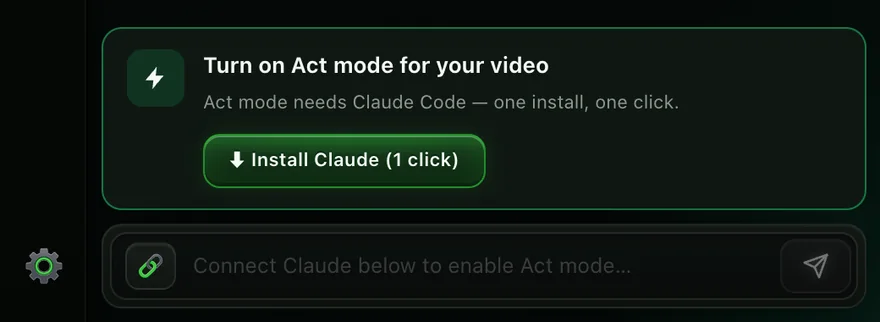
an installer window opens. Let it finish, then click again.
Act or Chat, Plan or Auto: which mode when?
Two switches decide how much freedom the agent gets. Choose them before you type.
| Setting | What it does | Use it when |
|---|---|---|
| Act | Chains the plugin's tools on your active sequence | You want the edit done |
| Chat | Answers from the transcript, timeline untouched | You want a summary, titles, chapters or a YouTube description |
| Act + Plan | Shows what it will do, then waits for your go | First runs, client projects, anything you can't redo |
| Act + Auto | Keeps going without stopping | Jobs you have already checked once in Plan |
Plan for anything that cuts, Auto for anything that only adds.
The Claude model is picked in the chat header. The captures in this guide show Opus 5.5.
What can you ask it? Commands to copy, by editing step
Write the way you talk, in English, French or Spanish. Each line maps to a real plugin tool.
Derushsilences, retakes, false starts
Cut the silences in the sequence.
Remove the false starts and retakes, keep the best take.
Do the full rough cut, silences included.
The full rough cut takes 5 to 10 minutes. Then the agent checks it and lists the cuts to hear.
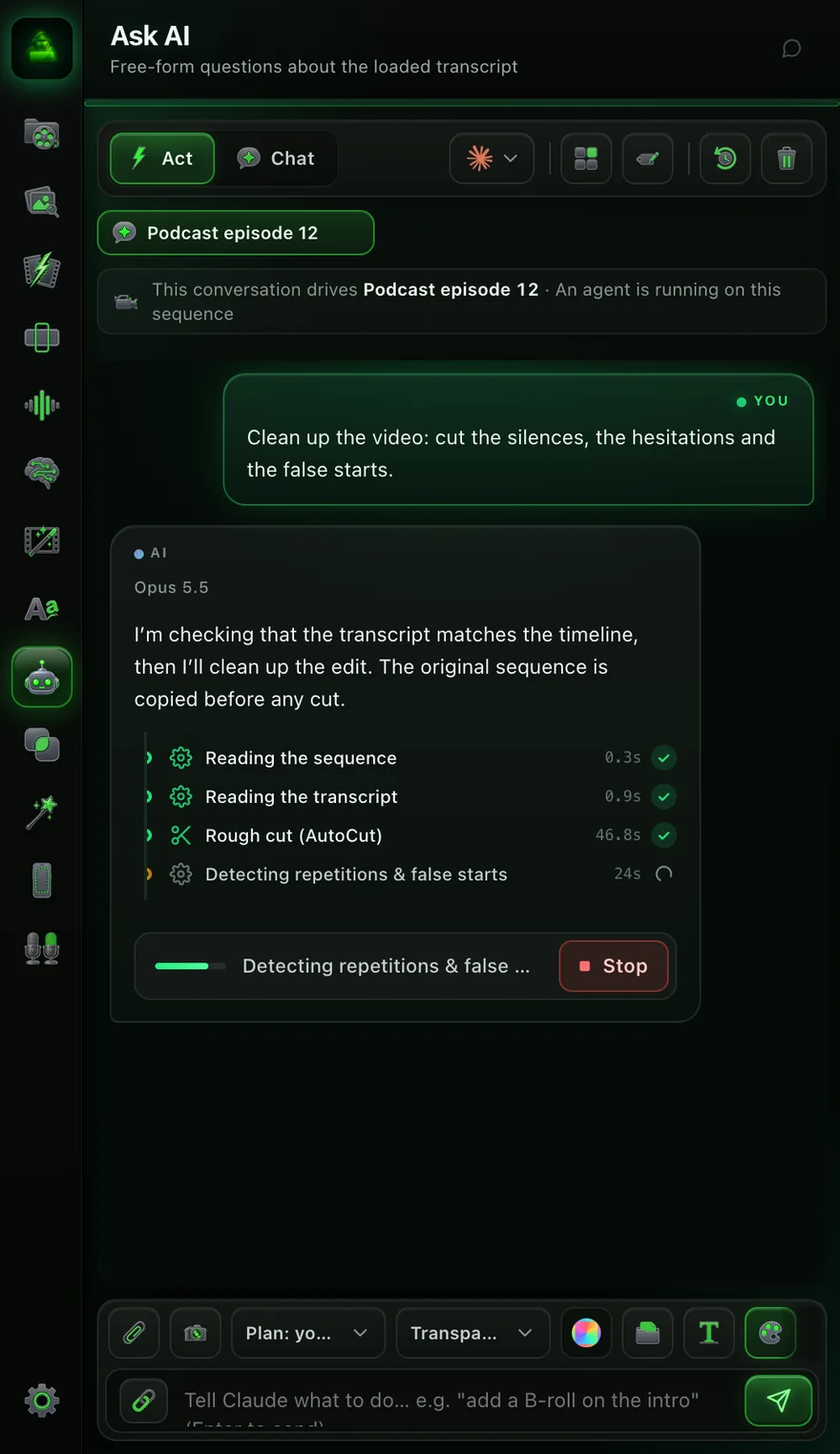
How to review that pass by hand: the guide to auto-derushing in Premiere Pro.
Captions, zooms and transitions
Add the captions with my favorite style, 3 words max per card.
Add zooms on the keywords, at 115%.
Put a transition on every shot change.
The settings behind each: captions, auto zoom, transitions.
B-roll and music
Place a drone shot from my B-rolls on this part.
Put markers on the beats of the selected music.
Cut my B-rolls to the beat of the music, 3 variations.
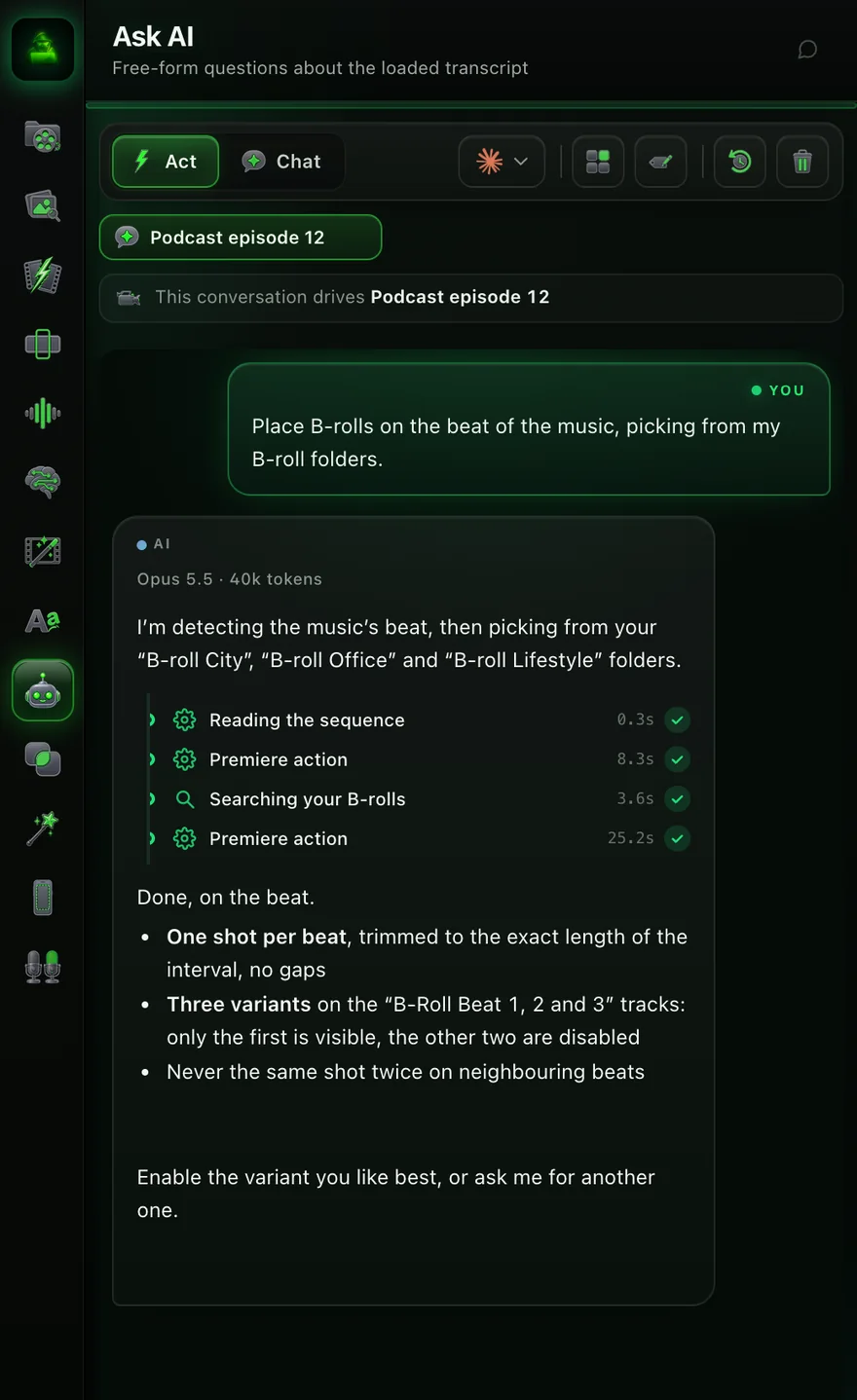
Generated shots instead of your footage: AI B-roll in Premiere Pro.
Sound and organizing
Put a whoosh on every shot change.
Put the clips back in script order.
Sort my project into bins by type.
Delete the empty tracks.
Chat modepublishing
Write the YouTube description for this video, with chapters.
What are the best moments for a 30-second short?
How do you aim it at one passage?
By default it works on the whole active sequence. Four ways to narrow it down:
- The IN→OUT chip. Set In and Out in Premiere, turn on the IN→OUT chip in the chat: it only works between those two points.
- A clip reference. Select a clip, click the link icon next to the message field, and the clip is named in your request.
- A picture. The paperclip attaches an image; the camera icon attaches the frame under the playhead.
- A queue, not an interruption. Messages you send while it works go out at the end, in order.
Each sequence keeps its own conversation. Conversations finds the older ones.
What stops it from wrecking your edit?
Three locks, written in code rather than in a prompt, so a long run can't forget them.
- Blocked tools. Write, Edit, Bash, WebFetch, WebSearch, Task and Agent are refused by name. It doesn't see your other MCP servers or your CLAUDE.md file.
- A copy before cuts. Passes that cut copy the sequence first, into
04 SEQUENCES › Backups. - An approval card before any spend. Anything that uses credits or your paid keys stops on a card: the tool, its settings, the estimated cost.
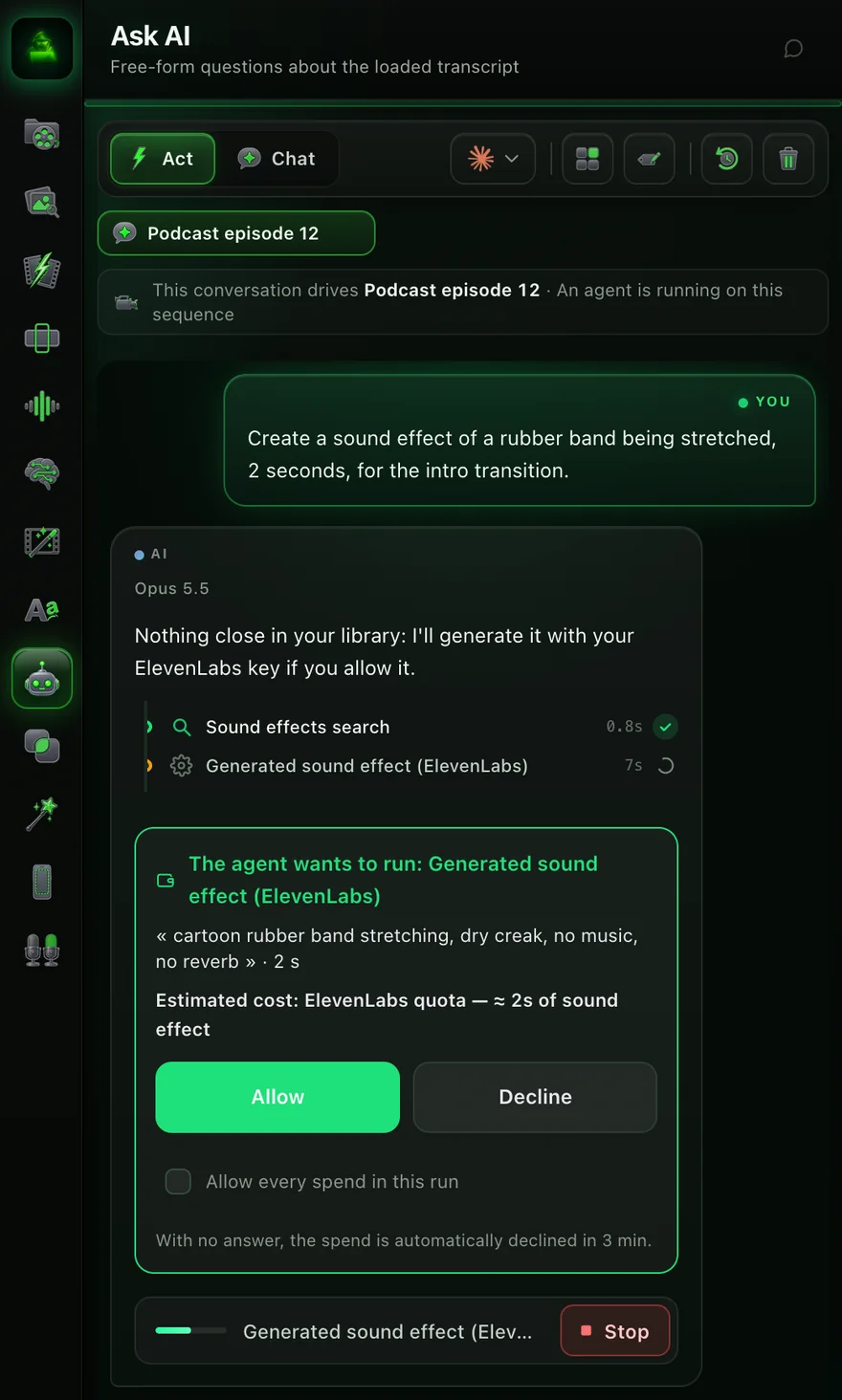
You answer Allow or Decline, or allow every spend for this run. No answer in 3 minutes means no.
it cuts what you asked for, not what you meant. Listen before you trust it.
What does it cost in total?
Two subscriptions, plus pay-per-use extras only when you ask for them.
| Item | Price | What it covers |
|---|---|---|
| Essentiel | $15/month or $144/year | Ask AI and every panel tool, no AI video credits |
| Pro | $40/month or $384/year | Everything in Essentiel, plus 4,000 AI video credits a month |
| Claude Pro | $20/month, or $17/month billed yearly | Your Claude account, Claude Code included |
| Claude Max | From $100/month | More usage per five-hour window |
| Pexels, Pixabay, ElevenLabs | Your own keys | Only the commands that use them |
Sources1plugin pricing
Cheapest setup: Essentiel and Claude Pro, both yearly. $144 + $200 = $344, about $29 a month.
Ask AI or another AI agent for Premiere?
Three other routes put an AI agent near Premiere Pro. They don't do the same job.
| Option | Where you talk | Which AI | What it touches | Price |
|---|---|---|---|---|
| Premiere AI Assistant (beta) | A panel in Premiere (Window › Assistant) | Adobe Firefly and partner models, not your choice | Project and timeline: bins, renaming, first assembly | Free daily credits during the beta |
| premiere-pro-mcp | Claude Desktop, Claude Code, Cursor, Codex | Your own AI | Premiere through a connector you install | Free, open source (MIT) |
| Black Hat Editor Tools (Ask AI) | The Ask AI tab in the plugin panel | Your Claude Pro or Max | Your sequence, through about a hundred plugin tools | From $15/month, plus Claude |

Sources23plugin pricing
built in, nothing to install, every action in Premiere's undo history.
your own Claude, editing tools, backups, and an OK before any spend.
premiere-pro-mcp lists far more raw tools, 436 in its README. You build the workflow yourself.
The wider picture, Resolve included: Claude in DaVinci Resolve 21.1, and in Premiere Pro.
What are its limits?
From daily use, the things to know before you rely on it.
- It needs a transcript. It reasons from the words and the timeline. Without a transcript, it asks for one first.
- It reads, it doesn't watch. In version 1.0.159 it doesn't view your video; it grabs the frame under the playhead to check a placement.
- Long jobs take minutes. A full rough cut runs 5 to 10 minutes. Messages you send meanwhile wait their turn.
- Claude's limits are yours. A heavy day can hit your Claude plan's five-hour limit.
- No tool, no action. If the plugin has no tool for a job, Ask AI can't do it: it has no shell to improvise with.
The rest of the landscape, by use case: the best AI plugins for Premiere Pro.
The short version
Install the plugin, connect Claude, switch to Act, keep Plan on. Then start with one sentence:
Cut the silences in the sequence.
Next, retakes and false starts: how to auto-derush in Premiere Pro.
Frequently asked questions
Is Ask AI free?
No. It comes with Essentiel ($15/month), Pro ($40/month) and the 14-day Pro trial (card required).
You also need your own Claude Pro or Max subscription.
Do I need to use a terminal to connect Claude?
Usually not. Act mode shows Install Claude (1 click), then Connect my Claude account.
Your browser opens to sign in. If the silent install fails, an installer window opens.
Does Ask AI work in French and Spanish?
Yes. Write the way you talk, in English, French or Spanish.
The panel itself exists in all three languages.
Can Ask AI damage my Premiere project?
It acts only through the plugin's tools, with no shell and no free file writing.
It copies the sequence before cutting. Keep Plan on for client work anyway.
Does it spend my AI credits without asking?
No. Paid tools first show an approval card with the estimated cost.
Without an answer, the spend is declined after three minutes.
What's the difference between Ask AI and Adobe's AI Assistant?
Adobe's AI Assistant (public beta since June 2026) runs Adobe's own models inside Premiere.
Ask AI runs your Claude through the plugin's editing tools.
Where is Ask AI in Premiere Pro?
Open Window › Extensions › Black Hat Editor Tools, then the Ask AI tab in the panel's sidebar.