🎬
18+ T2V models
Kling 3.0, Veo 3.1, Seedance 2.0, Sora 2, Hailuo 02, WAN 2.7, always the best model of the moment. No need to switch tools when a new one comes out.
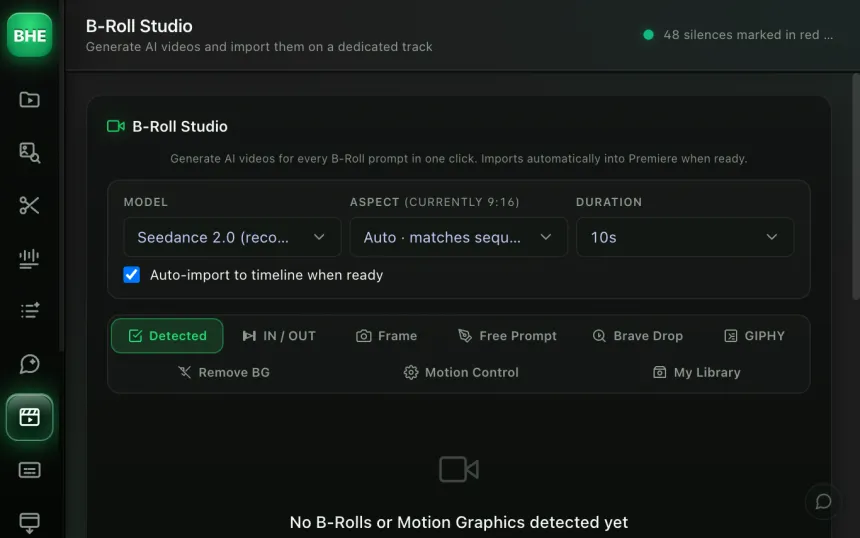
B-Roll Studio generates B-Rolls right inside Premiere Pro. Kling 3.0, Veo 3.1, Seedance 2.0: 18+ text-to-video models, 10+ image-to-video models. The aspect ratio is detected from your sequence. You pick a model, tweak the prompt, and the clip lands on your timeline.
macOS · Premiere Pro 2025+ · Windows in closed beta · 14-day trial
Three reasons editors adopt B-Roll Studio.
Kling 3.0, Veo 3.1, Seedance 2.0, Sora 2, Hailuo 02, WAN 2.7, always the best model of the moment. No need to switch tools when a new one comes out.
Deterministic mode for a zero-cost prompt with no LLM. Sonnet mode for automatic cinematic prompts. You choose by budget and need.
Generate several B-Rolls at once. Launch the generations, keep editing, the clips land on the timeline when they are ready.
Put the playhead where you want the B-Roll. Your sequence's ratio is detected automatically.
Kling 3.0, Seedance 2.0, Veo 3.1, pick the model that suits you. Write your prompt or let Sonnet mode write it for you.
The video is generated, imported into the project and placed automatically in the right spot. Nothing to move.
Sora 2, Kling 2.1 / 2.5 / 2.6 / 3.0, Seedance V1 / 2.0 / 2.0-fast, Hailuo 02, WAN 2.2 / 2.6 / 2.7, Grok Imagine, Veo 3 / 3.1, all from the same panel. The models marked "Top Pick" are the ones giving the best results to date.
Today: Seedance 2.0 (best overall), Kling 3.0 (texture detail), Veo 3.1 (camera movement). The ranking changes, the plugin keeps up.
In deterministic mode the prompt is built without any LLM call, zero extra cost. In Sonnet mode, Claude writes a detailed cinematic prompt from your short description: camera angle, lighting, movement, mood.
The result: you type "misty forest at sunrise" and Sonnet turns it into an 80-word prompt that produces a cinema shot. Or keep deterministic mode for total control and zero LLM cost.
No. Each model has its own cost through its API (KIE). The plugin does not charge for generation, you only pay the provider's credits. Deterministic prompt mode uses no LLM, so zero extra cost on that side.
It depends on what you are after. Seedance 2.0 is the best overall today. Kling 3.0 excels at textures and details. Veo 3.1 handles camera movement well. The models marked "Top Pick" in the panel are updated regularly.
It depends on the model. Most generate 720p or 1080p, 4 to 10 seconds long. The ratio is detected from your sequence (16:9, 9:16, 1:1, and so on) to avoid black bars.
Yes. 10+ image-to-video models are available. You provide a reference image and the model animates it. Handy for packshots, product photos or still frames you want to turn into video.
Between 30 seconds and 3 minutes depending on the model and server load. You can launch several generations in batch and keep editing, the clips are placed automatically when they are ready.
B-Roll Studio is one of 13 tools (plus 10 micro-tools) in the panel. Have a look at the others.
Try B-Roll Studio free for 14 days. 18+ models, zero alt-tab.
Start the free trial →Cancel online anytime from your account · Email support