🗃
Automatic indexing through ffprobe
Connect a folder, the plugin scans every video file with ffprobe and builds an incremental cache (.broll-index.json). New files get indexed, old ones are kept.
The Media library indexes your B-Roll folder through ffprobe, builds an incremental cache, and lets you search by keyword with lexical search and semantic reranking. Claude enriches the descriptions automatically.
macOS · Premiere Pro 2025+ · Windows in closed beta · 14-day trial
Three reasons editors organize their assets with the Media library.
Connect a folder, the plugin scans every video file with ffprobe and builds an incremental cache (.broll-index.json). New files get indexed, old ones are kept.
Tokenization with FR/EN stopwords, name/description/subfolder weighting. Semantic reranking by cosine embedding brings the most relevant results up.
Claude Code analyzes your clips and writes detailed descriptions automatically. The richer your descriptions, the more precise the search.
Point the Media library at a local folder. The plugin detects every video file in it, subfolders included.
ffprobe extracts the metadata of every clip. The incremental cache only rescans new files. Claude can enrich the descriptions in batch.
Type your search, lexical tokenization filters the results, and semantic reranking brings the most relevant clip to the top of the list.
Search combines two passes. First, a lexical tokenization strips FR and EN stopwords, then weights each token by whether it appears in the file name, the description, or the subfolder path. Then an optional semantic rerank by cosine embedding reorders the results to catch synonyms and context.
The result: you type "city night" and you find the clip named "timelapse-urban-nightfall.mp4" even without an exact match.
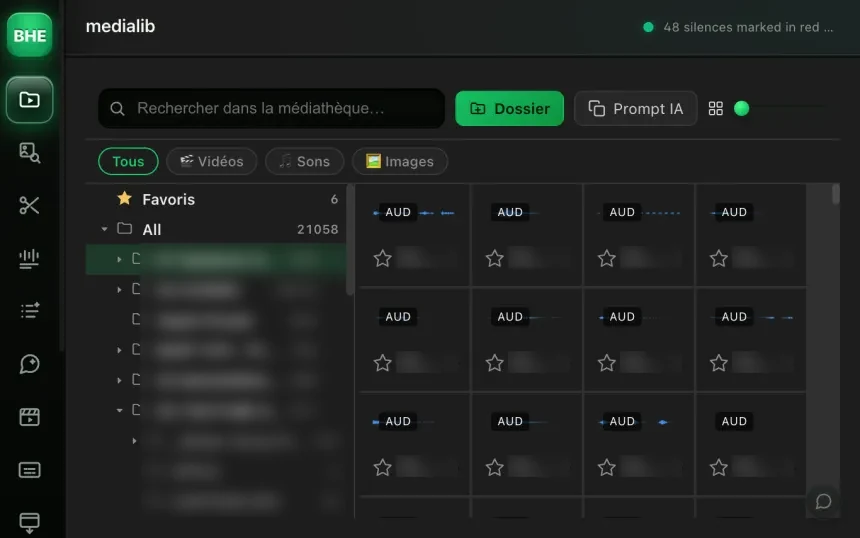
The .broll-index.json file stores the metadata of every clip already scanned. When you add new videos to the folder, only the new files go through ffprobe. The old ones stay cached. No full rescan, no pointless waiting.
Enrichment: Claude Code can write detailed descriptions for each clip by analyzing the video content. The richer the description, the better the search.
Every format ffprobe can read: MP4, MOV, MKV, AVI, WebM, ProRes, and so on. If ffprobe can extract the metadata, the file gets indexed.
The cache is incremental: every time the panel opens or refreshes, new files are detected and indexed. Files already scanned are not analyzed again.
After the lexical filter (keywords), an embedding model compares the meaning of your query with the clip descriptions through cosine similarity. That finds clips even when the exact words do not match.
No. Claude Code can enrich the descriptions automatically in batch. You can also edit them by hand to refine the search.
You connect a root folder. All subfolders are scanned recursively. The subfolder name counts in the search weighting.
The Media library is one of 13 tools (plus 10 micro-tools) in the panel. Have a look at the others.
Try the Media library free for 14 days. Card required · cancel online anytime from your account.
Start the free trial →Cancel online anytime from your account · Email support