🌐
6+ simultaneous sources
Pexels, Pixabay, Openverse, DuckDuckGo, YouTube, BBC Sound Effects, NASA, Mixkit, Wikimedia Commons. One search, all in parallel.
Media Finder queries Pexels, Pixabay, YouTube, BBC Sound Effects, NASA and more at the same time. Images, videos, sounds: everything lands in one grid. One click to download and place at the playhead.
macOS · Premiere Pro 2025+ · Windows in closed beta · 14-day trial
Three reasons editors adopt Media Finder.
Pexels, Pixabay, Openverse, DuckDuckGo, YouTube, BBC Sound Effects, NASA, Mixkit, Wikimedia Commons. One search, all in parallel.
Everything lands in the same grid: photos, video b-roll, YouTube clips, sound effects. Vertical/landscape detected automatically.
One click to download and place at the playhead. No browser, no drag and drop from the desktop.
A keyword, a sentence. Pick the media type: images, video b-roll, YouTube, Pinterest, sounds. Or leave everything ticked.
Each source races against a 7-second cap. Results drop into one unified grid as they arrive.
One click on the result: the file is downloaded, imported into the project and placed at the playhead on your timeline.
Each media type has its own sources. Images: Openverse and DuckDuckGo with no key, Pexels and Pixabay with your free key. Video B-roll: Wikimedia Commons, NASA and Mixkit with no key, Pexels and Pixabay with your key. YouTube: yt-dlp locally, no Google API key. Pinterest: DuckDuckGo restricted to the Pinterest domain. Sounds: Mixkit + BBC Sound Effects (33,000 indexable sounds).
Capped race: each source gets 7 seconds at most to answer. If one is slow, the others are already there.
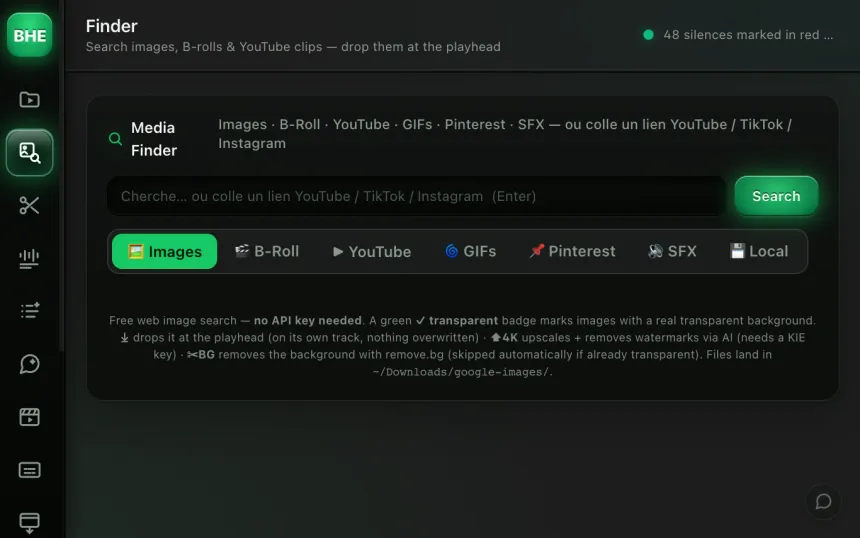
Beyond search, the Image Finder includes a post-processing pipeline. AI 4K upscale for low-resolution images. Remove BG with real transparency detection: the plugin decodes the canvas and counts alpha pixels to verify the transparency is real, not just a white background.
Download + place: the image is downloaded, processed and placed at the playhead in a single click.
Not for most sources: Openverse, Wikimedia, NASA, Mixkit, BBC and YouTube work without a key. Pexels and Pixabay need your free key, pasted in Settings.
Pexels, Pixabay, Mixkit and NASA publish under free-use licenses, each with its own terms. For YouTube, BBC Sound Effects and web results, check each source's license. The plugin shows the source of every result.
Yes. YouTube download uses yt-dlp locally. You can download a whole clip or define an excerpt. No length limit on the plugin side.
Yes, the AI upscale accepts any format (JPEG, PNG, WebP). The result is a high-resolution file placed directly on your timeline.
When you use Remove BG, the plugin decodes the image through a canvas and counts the pixels with an alpha channel. That verifies the transparency is real, not just a white background that looks like transparency.
Media Finder is one of 13 tools (plus 10 micro-tools) in the panel. Have a look at the others.
Try Media Finder free for 14 days. Card required · cancel online anytime from your account.
Start the free trial →Cancel online anytime from your account · Email support