


In short
Silence removal cuts dead air; a derush also removes what a waveform can't hear: retakes, false starts, stutters and "ums". Premiere Pro deletes "uh" and "umm" natively from its transcript. For repeated takes, you need a tool that reads a verbatim transcript, explains each cut and lets you listen first, like Cleanup AI in Black Hat Editor Tools.
In this article · 11 sections
- What is a derush, and why isn't silence removal enough?
- Can Premiere Pro derush on its own?
- Why does the transcript decide everything?
- How do you derush with Cleanup AI, step by step?
- Suggest cuts or One-shot rough cut: which button?
- Which settings actually matter?
- What if it cuts a good line or misses a repeat?
- Can you derush by talking to it?
- Which derush tool should you pick?
- When should you not auto-derush?
- The short version
the plugin's team. Premiere's own tools come first; rivals are priced below.
What is a derush, and why isn't silence removal enough?
A silence pass measures loudness. A derush reads what was said, and removes:
- "Ums" and verbal tics. The fillers between ideas: um, uh, you know.
- Retakes. The same sentence said twice or three times; only one take stays.
- False starts. A sentence abandoned after three words, then restarted.
- Stutters. "The, the", a word caught twice in a row.
- Pre-roll and post-roll. "Are we rolling?" before the intro, the chatter after the last line.
- Off-topic. The tangent about last night's match.
Linguists separate them too: fillers like "uh" behave differently from repeats and restarts1.
That's why a list of filler words never catches a retake.
it has its own guide, how to remove silences in Premiere Pro.
Can Premiere Pro derush on its own?
Partly, and for free. Two native tools cover part of the job.
- Filler words in Text-Based Editing. Premiere detects "uh" and "umm" in the transcript and deletes them all at once. Adobe says filler detection works in all 18 Speech to Text languages2.
- Paper Edit, since Premiere 26.5. You select the sentences to keep in the transcript and build a new sequence from them3.
Removing the fillers natively takes three steps:
- Transcribe.
Window > Text, Transcript tab, then Transcribe. - Filter. Click the funnel icon and choose Filler words.
- Delete. Pick Extract to ripple and close the gaps, or Lift to leave them.
no filter for a repeated sentence or a false start.
Why does the transcript decide everything?
Because most speech-to-text engines tidy up what you said.
Whisper "eliminates many filler words, recurring utterances and other artifacts"4.
If the transcript merged your two takes into one clean line, no detector can cut the bad one.
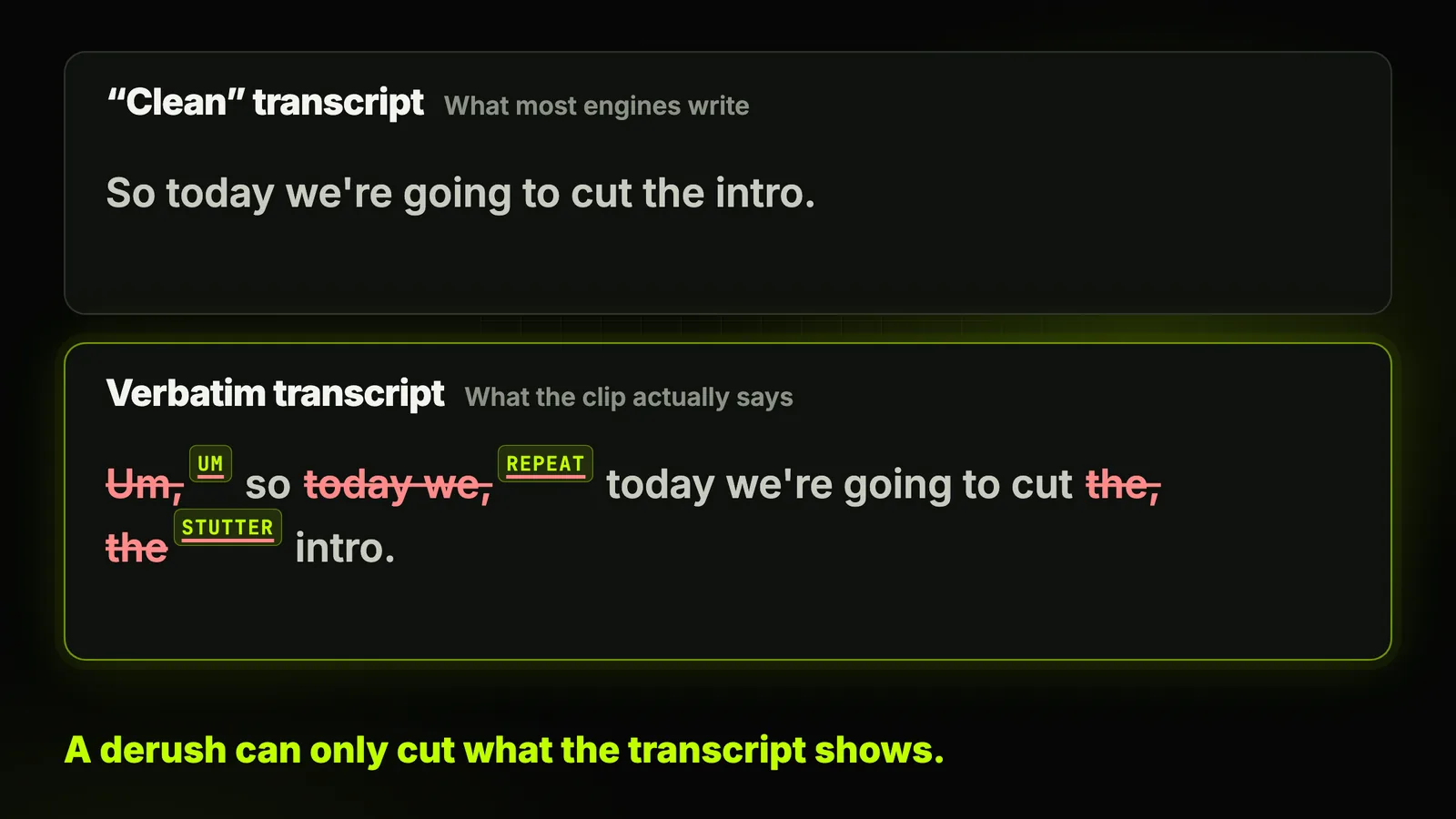
So the plugin offers a verbatim engine, run on your computer. It keeps the "ums" others drop.
In the transcription menu:
Advanced transcription (local) — verbatim, recommended for Cleanup
How do you derush with Cleanup AI, step by step?
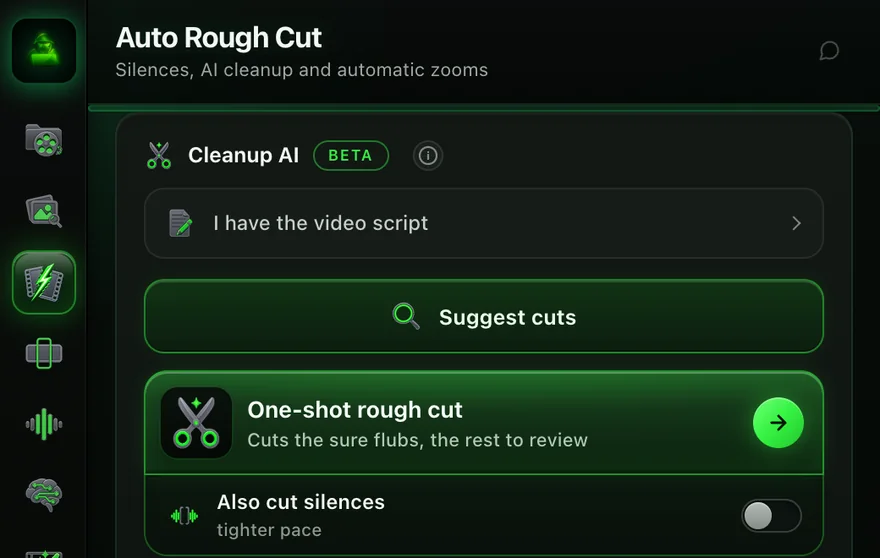
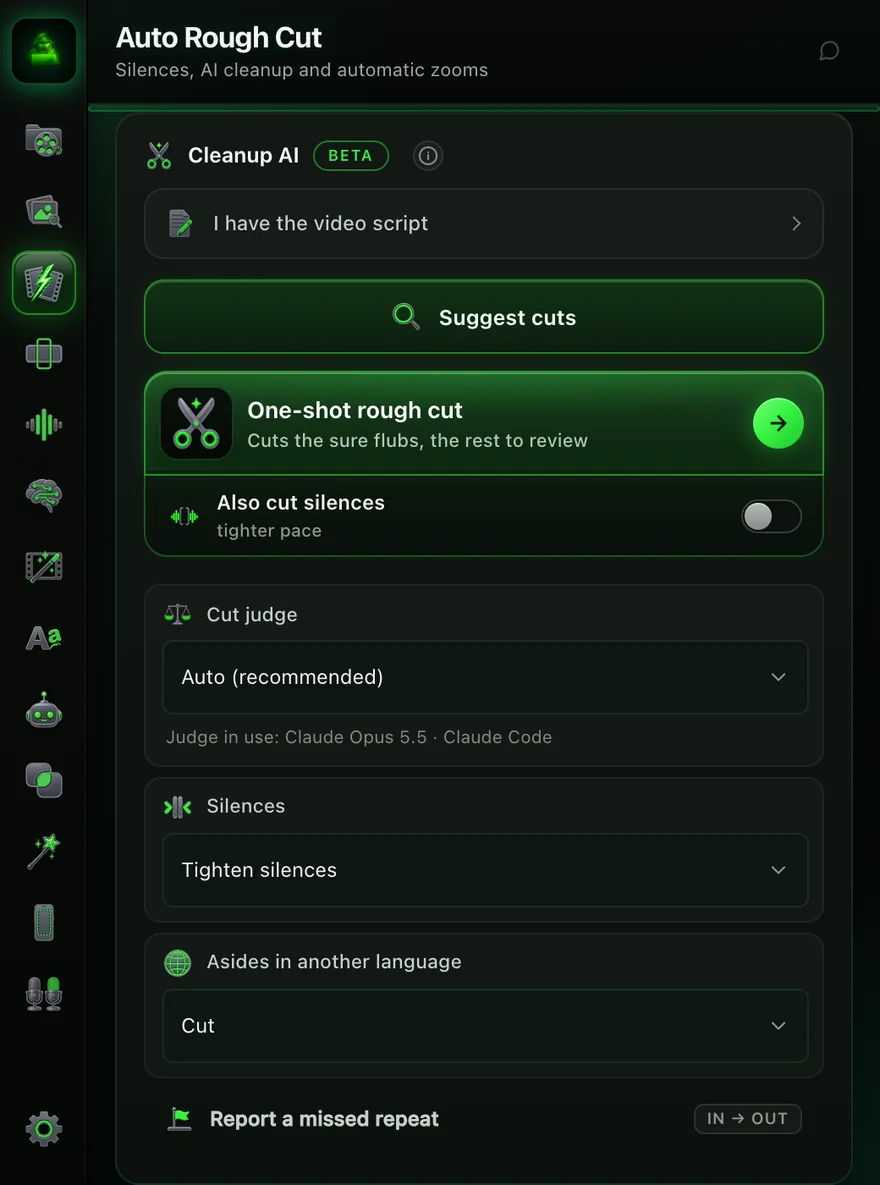
Cleanup AI sits in the Auto Rough Cut tab, next to Remove silences. It's labelled beta.
- Open the tab.
Window › Extensions › Black Hat Editor Tools, then Auto Rough Cut › Cleanup AI. - Paste your script, if you have one. Open I have the video script and paste the text the video should say. Detection then aligns on it.
- Click Suggest cuts. It transcribes the sequence if needed, detects the candidates, then has the AI judge check them. Nothing is cut yet.
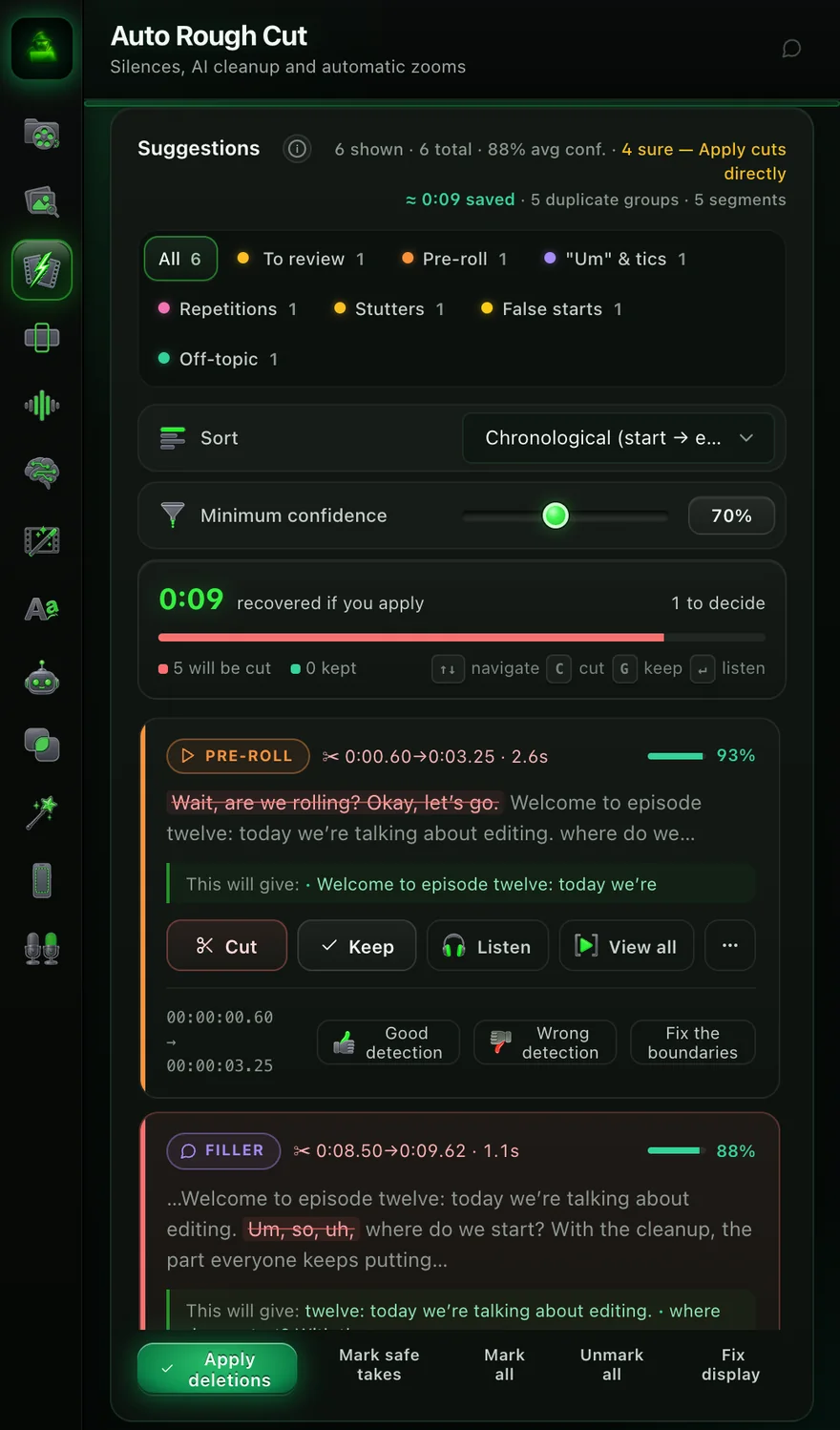
- Review the list. Each card shows the type, the timecode, a confidence score, the struck-out words, and This will give: the sentence after the cut.
- Apply deletions. Use Mark safe takes to tick only the sure ones, then Apply deletions.
Each card has Cut, Keep and Listen. Faster on the keyboard: C cuts, G keeps, Enter plays.
Suggest cuts or One-shot rough cut: which button?
Same detection behind both. The difference is who presses Cut.
| Suggest cuts | One-shot rough cut | |
|---|---|---|
| What it does | Lists every candidate, cuts nothing | Cuts the sure ones, leaves the rest under "To review" |
| Silences | Left alone | Optional (Also cut silences) |
| Passes | One | Two: a second pass catches leftovers |
| Time | The quicker of the two | 5 to 10 minutes on a typical talking-head video |
| Best for | Client work, a speaker you don't know yet | Your own videos, a speaker whose habits you know |
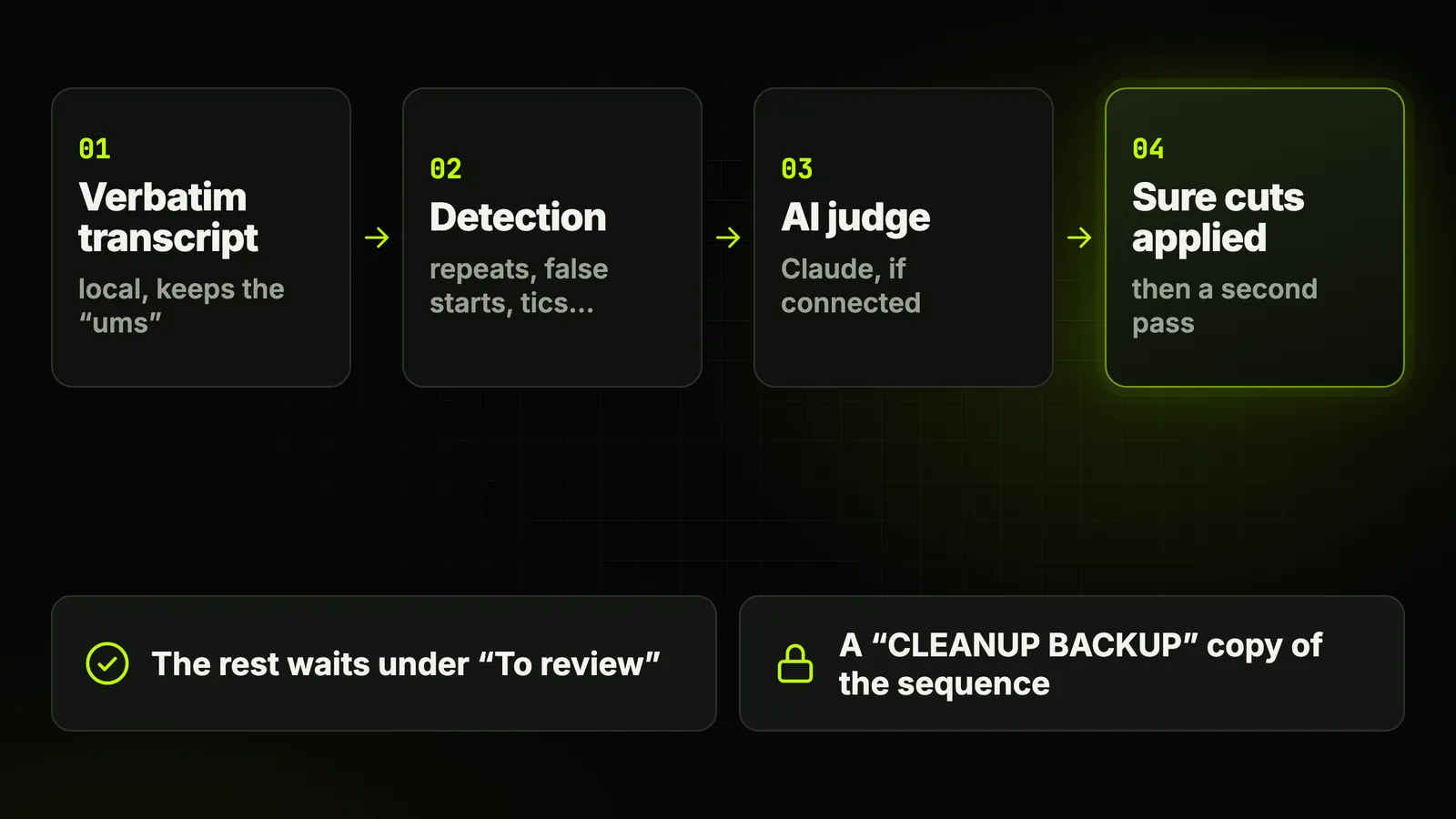
off-topic, pre-roll and post-roll are never cut on their own.
Which settings actually matter?
Four controls under the buttons, one slider in the list. When to touch them:
- Cut judge. Auto (recommended) uses Claude Opus 5.5 through Claude Code when it's connected. You can force a Claude API key or a ChatGPT key instead. With no AI connected, it runs on rules alone, without a judge.
- Judge in use. The line under the menu names the model that actually judged your cuts. When a fallback model does, the panel warns that it over-cuts and suggests connecting Claude Code.
- Silences. Tighten silences (default) also shortens long gaps during the derush; Keep silences leaves your pacing alone.
- Asides in another language. Cut, Ask me or Ignore: for the creator who switches language mid-take.
- Minimum confidence. 70% by default, from 50 to 95. Lower it to see more candidates, raise it to see only the obvious ones.
it keeps the last complete take. Clips out of shooting order? Paste the script.
What if it cuts a good line or misses a repeat?
Nothing here is final. Four ways back, all in the panel:
- Restore the copy. Applying cuts first saves a CLEANUP BACKUP copy of the sequence.
- Teach it. Each card has Good detection, Wrong detection and Fix the boundaries. Your verdicts train the detection.
- Report what it missed. Set In and Out on a leftover repeat and click Report a missed repeat. Cut the flagged repeats then removes everything you flagged.
- Re-read the recap. Review the last rough-cut summary reopens what was removed and the time saved.
Can you derush by talking to it?
Yes: Ask AI, the plugin's chat, drives the same tools. In Act mode, type one of these:
Remove the false starts and retakes, keep the best take.
Only cut the sure passages and show me the rest.
Do the full rough cut, silences included.
Afterwards, the agent checks the sequence and lists the cut points worth a listen.
Setup and every other command: the Ask AI guide for Premiere Pro.
Which derush tool should you pick?
Five options, prices read on each vendor's page on 21 October 2026.
| Tool | Retakes | Filler words | Where it runs | Price for retake removal |
|---|---|---|---|---|
| Premiere Pro (native) | No, Paper Edit by hand | "uh", "umm", 18 languages (Adobe, 2023) | Inside Premiere | Included |
| AutoCut | AutoCut Repeat, reviewed in an editor, optional script | Yes | Premiere plugin | AI plan, $19.80/month or $178.80/year; 14-day trial, no card |
| FireCut | "Remove repetition" | English only | Premiere plugin | Pro, $34/month or $20/month yearly; 7-day trial |
| Gling | "Remove bad takes" | Yes | Its own app, XML export to Premiere | Plus, $20/month or $10/month yearly; free plan can't export to Premiere |
| Black Hat Editor Tools | Cleanup AI (beta), last complete take kept, optional script | French and English list | Premiere plugin | Essentiel, $15/month or $144/year; 14-day Pro trial, card required |

cheaper entry, a no-card trial, 80+ languages for repeats.
a named judge, editorial cuts left to you, a backup, and chat control.
our filler list covers French and English. Elsewhere, check the "ums" by hand.
By vendor: AutoCut alternatives and FireCut alternatives.
When should you not auto-derush?
A derush removes hesitation. Sometimes hesitation is the point.
- Interviews where searching for words is the story. A guest who hesitates before a hard answer is not a flub.
- Comedy and rhythm. A deliberate repeat is a joke, not a retake. The plugin guards against rhetorical repeats, but it can't know your intent.
- Clips out of shooting order. The keep-the-last-take rule breaks. Paste the script, or reorder first.
- Music, ambience, ASMR. Nothing to derush: the silences are the content.
- A client deliverable you won't review. Use Suggest cuts, not One-shot, and listen to every card.
Captions come after the cuts: automatic subtitles in Premiere Pro.
The short version
Premiere's free filter handles "uh" and "umm". Retakes need a verbatim transcript.
- Client work. Suggest cuts, then review every card.
- Your own videos. One-shot, then listen to To review.
More: the AutoCut feature page and the AutoCut help page.
Frequently asked questions
What does derush mean in video editing?
The first cleaning pass on raw footage: bad takes, repeats, false starts, stutters and fillers go.
Silence removal is one part of it. The retakes need a transcript.
Can Premiere Pro remove repeated takes automatically?
Not natively. Premiere deletes "uh" and "umm"; Paper Edit lets you keep sentences by hand.
For repeated takes, use a plugin: AutoCut Repeat, FireCut or Cleanup AI.
Do I need Claude to use Cleanup AI?
No. Without AI, it runs on its rules alone, with no judge.
With Claude Code connected, Claude Opus 5.5 judges each cut. The panel recommends it.
Does Cleanup AI work in Spanish or other languages?
Partly. Retakes and false starts are found by comparing words, in any language.
The filler list covers French and English: check the "ums" by hand elsewhere.
Is Cleanup AI in the free plan?
No. It's in the paid plans: Essentiel at $15 a month or Pro at $40 a month.
The 14-day Pro trial includes it, card required.
Can I undo a Cleanup AI derush?
Yes. Before applying cuts, it saves a CLEANUP BACKUP copy of the sequence.
Sources 8 links
- researchconnect.stonybrook.edu/en/publications/disfluency-rates-in-conversation-effects-ofBortfeld et al., 2001
- community.adobe.com/announcements-732/now-in-beta-filler-words-and-other-text-bAdobe, September 2023
- community.adobe.com/announcements-727/what-s-new-in-adobe-premiere-26-5-septembAdobe, September 2026
- arxiv.org/abs/2408.16589Wagner et al., 2024
- autocut.com/en/pricingAutoCut pricing
- autocut.com/autocutrepeatAutoCut Repeat
- firecut.ai/pricing/premiere-proFireCut pricing
- gling.ai/pricingGling pricing