In short
No, this isn't Adobe, and it isn't pirated. ArtCraft, developer Brandon Thomas's company, released seven free, open-source apps modeled on Adobe's in early October 2026. We installed FilmCraft (a Premiere Pro look-alike) and EffectCraft (an After Effects look-alike): promising, but alpha, and they can't open your Adobe projects.
In this article · 13 sections
- What is ArtCraft, and who made these Adobe clones?
- Which Adobe apps have a free clone?
- What can FilmCraft, the free Premiere Pro alternative, do?
- What can EffectCraft, the free After Effects alternative, do?
- We installed them: how did our test on an M2 Max Mac go?
- How long does an EffectCraft render take?
- What limits did we run into?
- Can FilmCraft open your Premiere Pro and After Effects projects?
- Is it legal, and is it really free of Adobe code?
- How do you install FilmCraft and EffectCraft without getting a fake?
- Who are these free clones useful for today?
- Staying on Premiere Pro? Edit faster with Black Hat Editor Tools
- In short
I build Black Hat Editor Tools, a Premiere plugin. No ties to ArtCraft or Adobe.
Checked on October 12, 2026: official GitHub repos, CineD's report, and our own test on an M2 Max Mac.
What is ArtCraft, and who made these Adobe clones?
One developer, his company, and an AI that wrote the code. Here is what CineD reports1:
- Who. Brandon Thomas, former CEO of Storyteller.ai, the company behind FakeYou, with his studio ArtCraft.
- How. In Rust, with Anthropic's Claude Opus 5.5, by his own account. CineD notes the AI's share of the code isn't independently verified.
- Why. Adobe's cancellation fee, which he calls a "dark pattern".
- Who pays. ArtCraft's paid business, an AI image and video generation service.
EffectCraft's first commit landed on October 1, 20262.
PetaPixel had already covered the launch on October 73.
Which Adobe apps have a free clone?
Seven apps, one per major Creative Cloud program:
| ArtCraft app | Adobe equivalent | What it's for |
|---|---|---|
| FilmCraft | Premiere Pro | Editing, color, mixing |
| EffectCraft | After Effects | Motion graphics, effects, compositing |
| PhotoCraft | Photoshop | Retouching, layers, PSD files |
| VectorCraft | Illustrator | Vector illustration |
| LightCraft | Lightroom | Photo library, raw development |
| DesignCraft | InDesign | Page layout |
| PdfCraft | Acrobat | Reading, organizing and securing PDFs |
- License. MIT or Apache-2.0, your choice: you can use, modify and redistribute them.
- Platforms. macOS, Windows and Linux, natively.
- Status. Alpha, by ArtCraft's own label.
- What's next. The site lists twelve apps, with Word, Excel and PowerPoint in its sights4.
What can FilmCraft, the free Premiere Pro alternative, do?
On paper, most of Premiere: the same panels, tools and shortcuts. According to its README5:
- Editing. Source and Program monitors, three-point editing, ripple, roll, slip and slide trims.
- Color. A Lumetri-style panel: basic correction, curves, color wheels, HSL secondary.
- Audio. Track mixer, automation, EBU R128 loudness meters.
- Formats. Its own codecs, no FFmpeg. Exports H.264, ProRes 422 HQ and DNxHR.
- Agents. More than 650 commands an AI can drive through an MCP server.
86% of the features exist, 56% ready for real work.
That's the team's own estimate, from October 10, against Premiere Pro 26.5.2.
Its gaps, per the README: speed on heavy footage, no plugins, no camera RAW.
What can EffectCraft, the free After Effects alternative, do?
The youngest app in the suite, and the most ambitious. According to its README2:
- After Effects basics. Compositions, layers, keyframes, Graph Editor, expressions.
- 306 effects. All 298 of After Effects', with their parameters, plus a few more.
- 3D. Classic 3D and Advanced 3D, cameras, depth of field, lights, shadows.
- Export. ProRes up to 4444 XQ with alpha, H.264, HEVC, AV1, Lottie.
- Scripts. An ExtendScript-style object model you can run from the command line6.
91% of the features exist, 45% of the way to a real replacement.
The README warns: nothing automatically compares its renders with After Effects' yet.
We installed them: how did our test on an M2 Max Mac go?
On October 12, on an M2 Max Mac (64 GB). Goal: render a real motion design scene, headless.
- Download. EffectCraft 0.8.0 and FilmCraft 0.6.0, from the official releases. SHA-256 checksums matched the published ones.
- Open. Gatekeeper accepts them: both apps are signed and notarized by Apple.
- Write the scene as a script. A regular After Effects script (ExtendScript) describes the title, the cards and the camera.
- Render headless.
effectcraft-cliruns the script, then renders a ProRes 4444 with transparency, at 1080×1920.
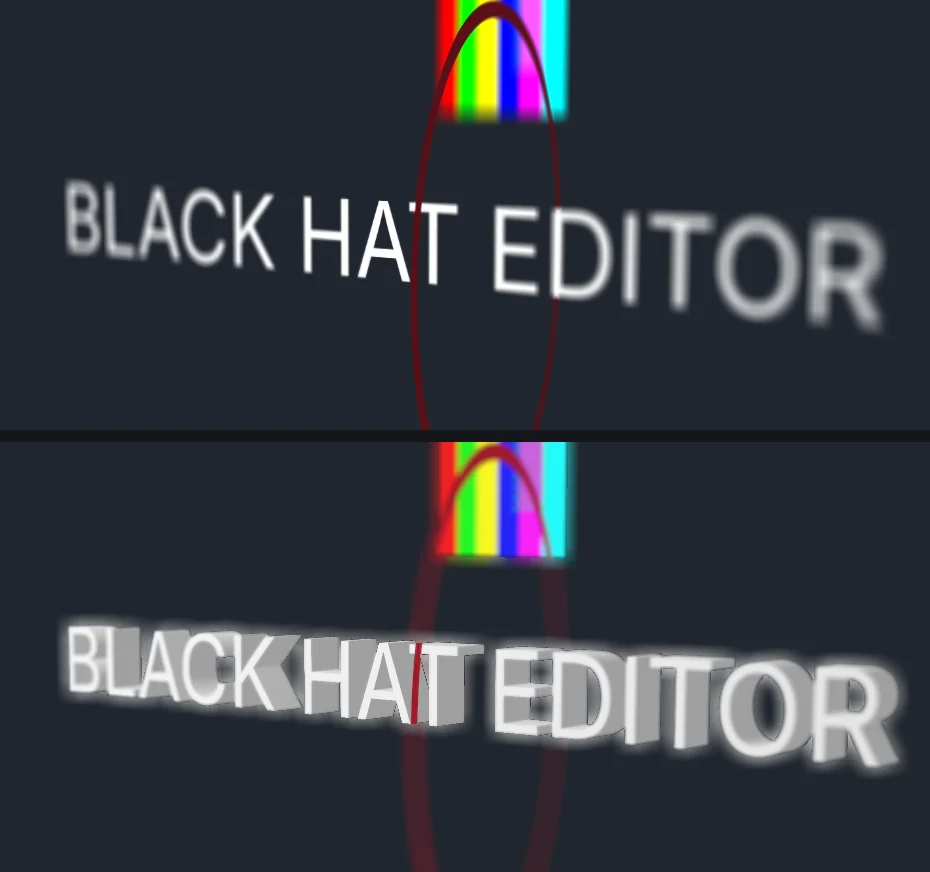
The scene: a 3D title word by word, two image cards, a camera that orbits then moves in.
With depth of field and motion blur.
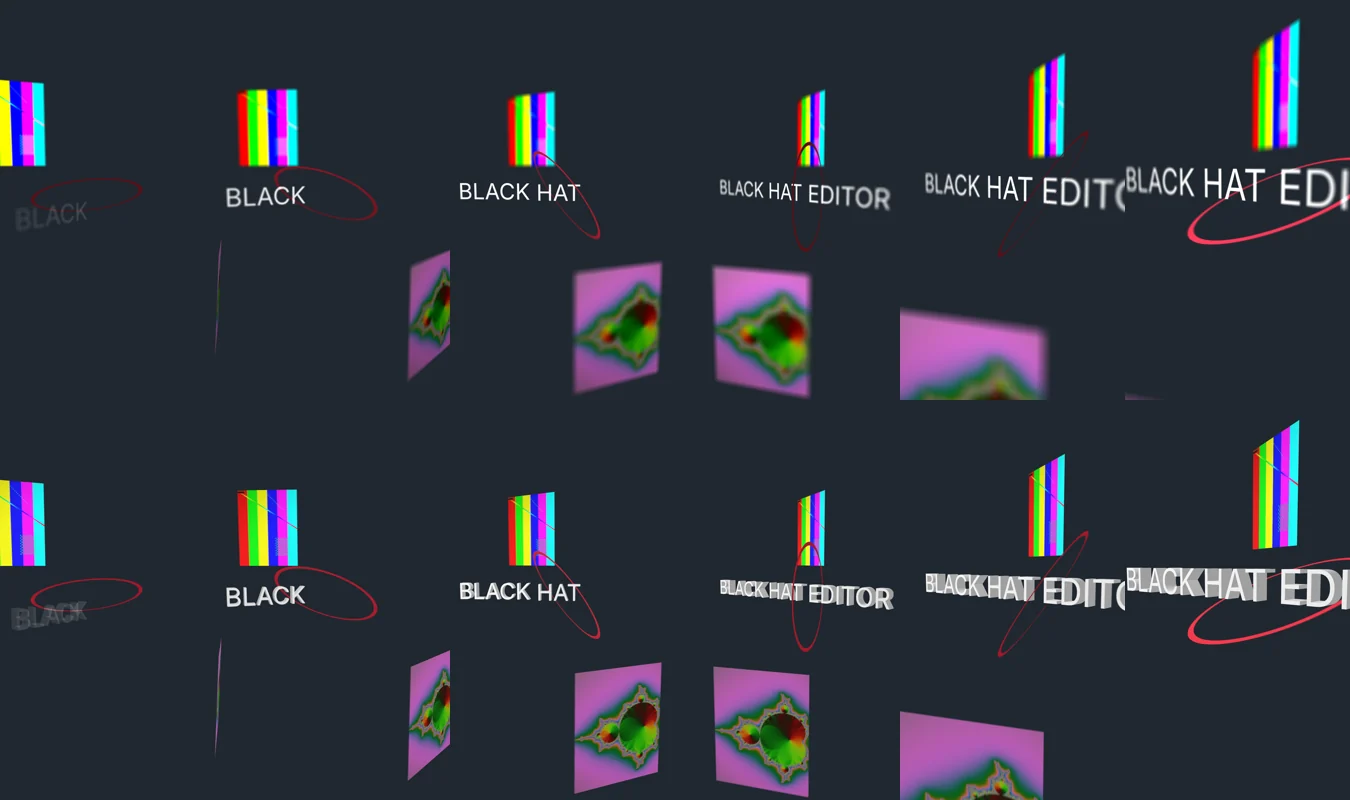
it works. We mapped two clips onto the cards, one of them 10-bit HEVC, with no prior conversion.
its demo project exports cleanly to FCP7 XML and OpenTimelineIO.
How long does an EffectCraft render take?
Fast in Classic 3D, heavy in Advanced 3D. Our numbers for 5 s of 1080×1920 video at 30 fps:
| Render mode | Time for 5 s | Peak memory |
|---|---|---|
| 2D title, no 3D (CPU) | ≈ 1.5 s | ≈ 1 GB |
| Classic 3D (GPU) | ≈ 9 to 10 s | ≈ 2.2 GB |
| Classic 3D, video on the cards (GPU) | ≈ 11 s | ≈ 3.8 GB |
| Classic 3D (CPU) | ≈ 19 s | ≈ 3 GB |
| Advanced 3D (GPU) | 26 to 30 s | ≈ 6.5 GB |
| Advanced 3D (CPU) | 63 to 66 s | ≈ 6.1 GB |
53 s. The next ones: about 9 s, timed with time.
The Mac was busy with other work during the Advanced 3D runs: treat these as indicative.
What limits did we run into?
Real ones, for software born on October 1. The ones we saw ourselves:
- Depth of field in Advanced 3D. The title, sitting at the focus distance, came out blurred, with a halo. We turned it off.
- Advanced 3D is heavy. About three times slower than Classic 3D, and 6 GB of memory for 5 seconds.
- It changes every day. EffectCraft went from 0.6 to 0.8 between October 8 and 11: three versions in four days7.
a real edit in FilmCraft, Windows, Linux (macOS is the most tested).
Can FilmCraft open your Premiere Pro and After Effects projects?
No, not directly: both READMEs say so in black and white. What moves across is an interchange format, not your project.
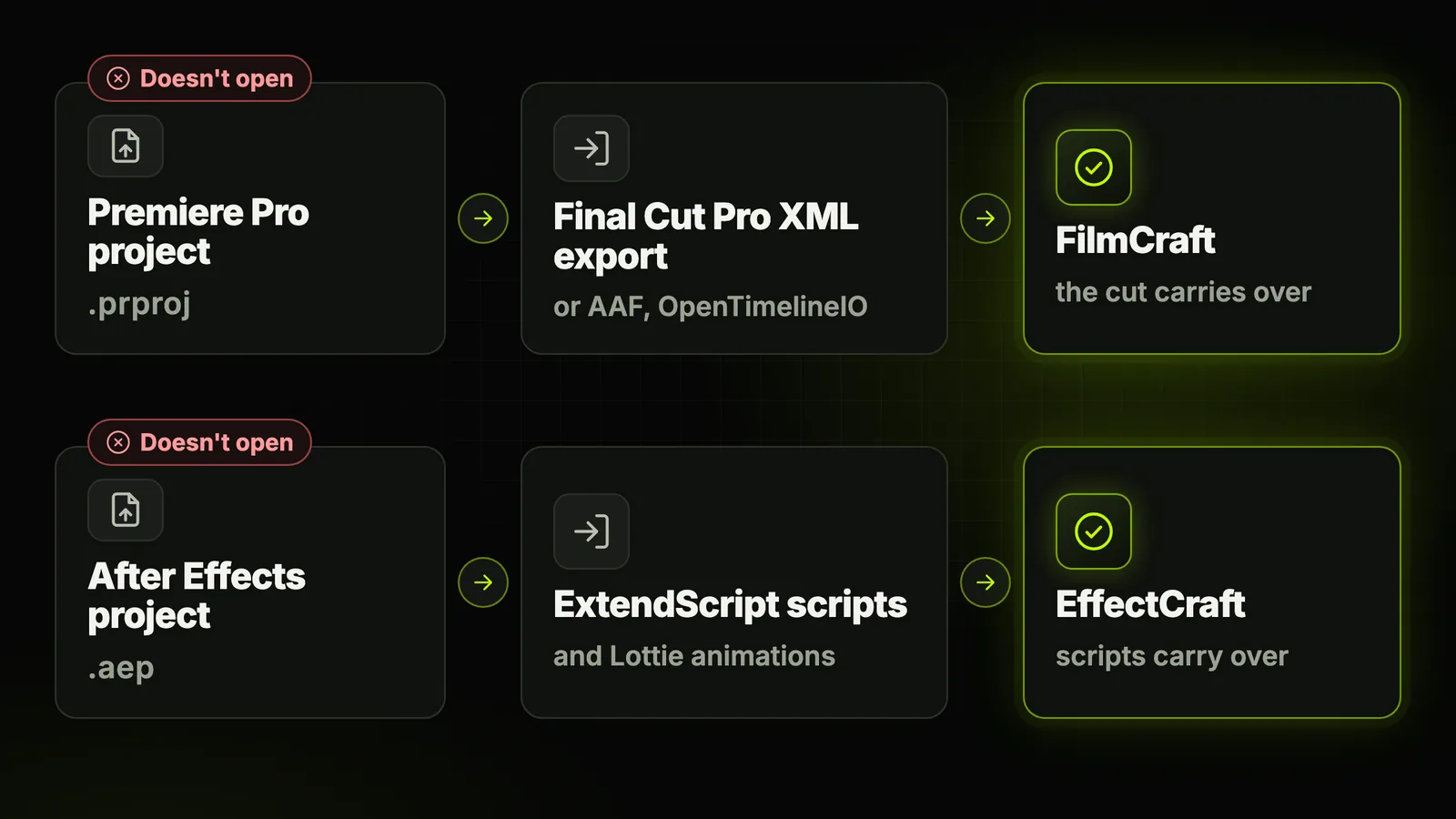
- From Premiere to FilmCraft. Export your sequence with
File > Export > Final Cut Pro XMLin Premiere, then import it. AAF and OpenTimelineIO work too. - What the XML carries. The cut, transitions, Motion and Opacity, speed changes and audio levels, according to FilmCraft. The list stops there.
- From After Effects to EffectCraft. Nothing for
.aepfiles. Your ExtendScript scripts can run, and Lottie animations import. - Third-party plugins. None: no After Effects plug-ins, no VST3, no OpenFX.
Is it legal, and is it really free of Adobe code?
Two different questions. Using free software under the MIT or Apache license is legal, and this isn't cracked Adobe.
- What the projects say. No Adobe code, icons, presets or LUTs. The work starts from public documentation and from how the apps behave.
- What isn't proven. The "clean room" method hasn't been independently verified, CineD points out.
- The real debate. The clones copy Adobe's panels, menus and shortcuts. In US law, interface behavior has long been hard to protect, CineD notes.
- Adobe. No public comment as of October 12, per CineD.
Premiere Pro and After Effects belong to Adobe, unrelated to these projects5.
How do you install FilmCraft and EffectCraft without getting a fake?
Success attracts copies: on GitHub, about ten recent repositories carry the same names.
- One source only.
getartcraft.comorgithub.com/storytold, the official account. Never a link sent in a DM. - The right file. On Mac, the "macos-universal"
.dmg. On Windows, the.msifor your processor. - The checksum. Compare it with the
SHA256SUMS.txtfile published with every version. - The signature. On Mac, check it once the app is installed.
Both checks, in Terminal:
shasum -a 256 ~/Downloads/filmcraft-0.6.0-macos-universal.dmg
spctl -a -vv /Applications/FilmCraft.app
accepted and Notarized Developer ID.
On our Mac, the signer was Learning Machines LLC (DJ6XS33FX8), not "ArtCraft".
Who are these free clones useful for today?
For testing and learning, not for client delivery: even EffectCraft's README says so.
- You're starting out with no budget. You learn panels and shortcuts close to Adobe's, for free.
- You code or automate. Everything is drivable: command line, MCP server, ExtendScript-style scripts.
- You edit on Linux. Premiere and After Effects don't exist there; these clones do.
- You edit for clients. Wait: no
.prproj, no plugins, and it's alpha.
free, open source, no subscription and no cancellation fee, drivable by an AI.
your projects open, your plugins run, and the software is proven in production.
Need a free, mature editor today? DaVinci Resolve has a free version8.
We compare it with Premiere in Claude in DaVinci Resolve, and what about Premiere Pro.
Staying on Premiere Pro? Edit faster with Black Hat Editor Tools
If time costs you more than the subscription: BHE adds to Premiere Pro (Mac; Windows in closed beta).
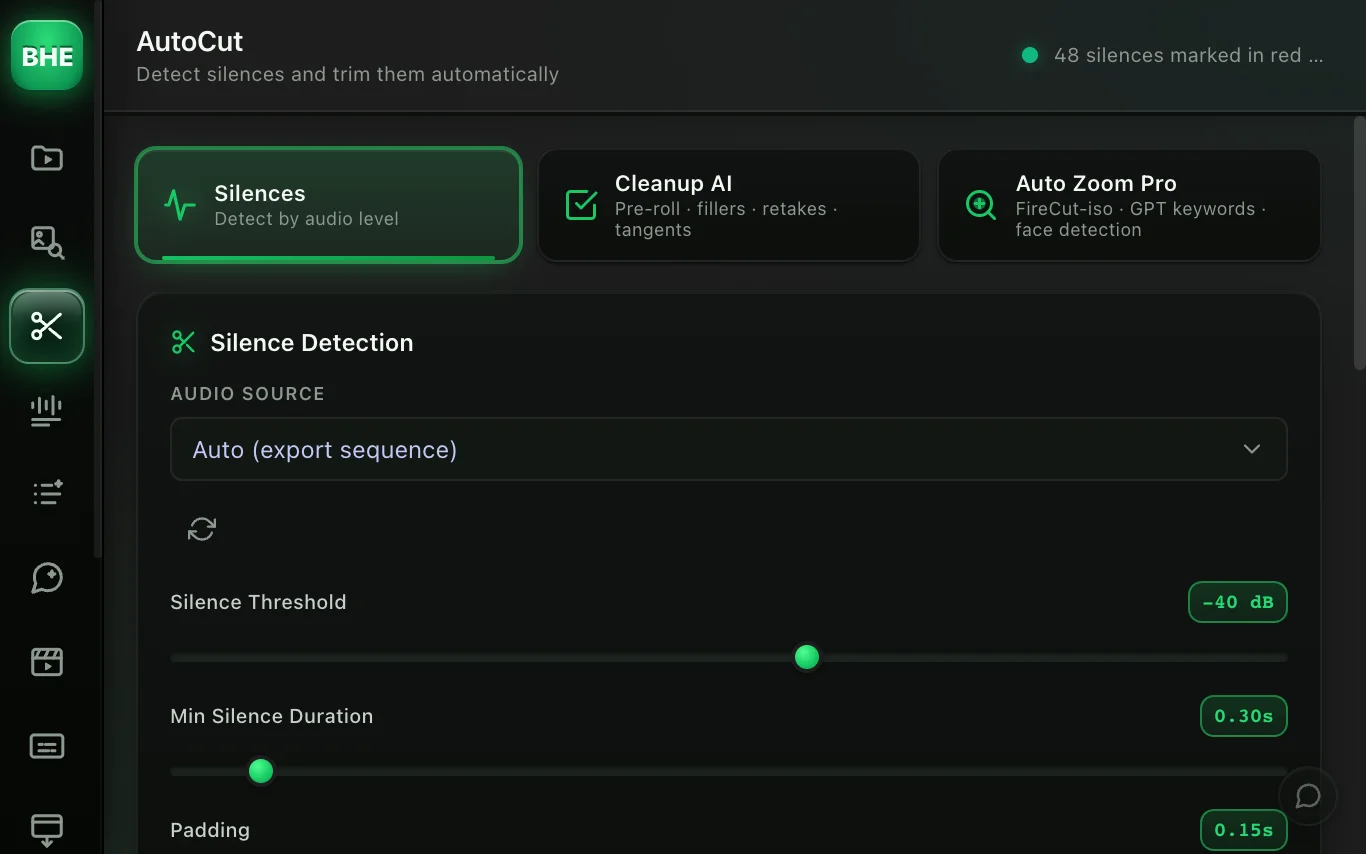
- Derush. AutoCut removes silences, with a preview before it cuts.
- Animated captions. 50+ word-by-word styles, transparent background, placed on the timeline.
- Motion design. The agent animates a figure or a title on the spoken word: see Claude Opus 5.5 for motion design in Premiere Pro.
- Ask AI. You describe the edit, the Ask AI agent does it on your timeline, with your Claude subscription.
A sentence to type in Ask AI's Act tab, to get started:
Cut the silences in the sequence.
Pricing (details):
- Free. No card, account required. AutoCut and Ask AI aren't included.
- Essentiel or Pro. $15 or $40 a month. 14-day Pro trial, card required.
- Claude. Your Claude subscription, for Ask AI, isn't included.
See all the tools · start the 14-day trial · plugin install guide.
And these open-source 3D engines? We're studying them for 3D cameras in the plugin, with no date and no promise.
In short
- It isn't Adobe. Seven free, open-source clones written in Rust, with Claude according to their author.
- It's alpha. FilmCraft rates itself 56% ready for real work, EffectCraft 45% of the way.
- It already renders. Our 3D scene comes out as transparent ProRes 4444 in about 9 seconds (Classic 3D, GPU).
- Your projects stay with Adobe. No
.prproj, no.aep.
Thinking about switching tools? Read switching from CapCut to Premiere Pro.
And if derushing is eating your evenings: remove silences in Premiere Pro.
Frequently asked questions
Are FilmCraft and EffectCraft really free?
Yes. They're free, open-source apps under the MIT or Apache-2.0 license, with no subscription.
ArtCraft funds their development with its paid AI generation service, according to CineD.
Is it legal to use these Adobe clones?
For you as a user, yes: they're open-source software, not pirated copies of Adobe.
The debate is about the unverified "no Adobe code" method. Adobe hasn't commented.
Does FilmCraft open Premiere Pro projects (.prproj)?
No. FilmCraft has its own format and doesn't open .prproj files.
Export your sequence as Final Cut Pro XML from Premiere, then import it. AAF and OpenTimelineIO work too.
Does EffectCraft replace After Effects?
Not today. Its team puts it 45% of the way for professional work, and it doesn't open .aep files.
It already renders: our 5 s 3D scene comes out as ProRes 4444 in ≈ 9 s (Classic 3D, GPU).
Is this an Adobe offer, or pirated Adobe?
Neither. ArtCraft is independent of Adobe, and its apps contain no Adobe code, according to their authors.
The names Premiere Pro and After Effects are only used to describe what each app imitates.
Where can I download FilmCraft safely?
From getartcraft.com or the storytold GitHub account, nowhere else.
Compare the SHA-256 checksum with the SHA256SUMS.txt file.
On Mac, spctl -a -vv should print Notarized Developer ID.
Do FilmCraft and EffectCraft run on Windows and Linux?
Yes, natively. Their READMEs warn that macOS is still the most tested platform.
Sources 8 links
- cined.com/artcraft-releases-free-open-source-adobe-alternatives-filmcCineD, October 12, 2026
- github.com/storytold/effectcraftEffectCraft on GitHub
- petapixel.com/2026/10/07/someone-rebuilt-free-open-source-versions-of-pho
- getartcraft.com/apps
- github.com/storytold/filmcraftFilmCraft on GitHub
- github.com/storytold/effectcraft/blob/main/docs/scripting-parity.mdEffectCraft scripting
- github.com/storytold/effectcraft/releasesEffectCraft releases
- blackmagicdesign.com/products/davinciresolveBlackmagic Design